

Background
SCES contains a copy of every client record that has been entered into the database by all participating SCES partner agencies. Staff members can search for, and create new client records on the client search page. Before creating a new client record, staff members should first use the search function to check whether a client record already exists for the client. If a client record does not exist for a given client, staff members can create a new client record.
Adding a New Client Record
Step 1: Navigate to, and click on the search icon in the upper right-hand corner of the screen

Step 2: Click on the "Add Client" button above the search bar to be redirected to the client profile creation screen
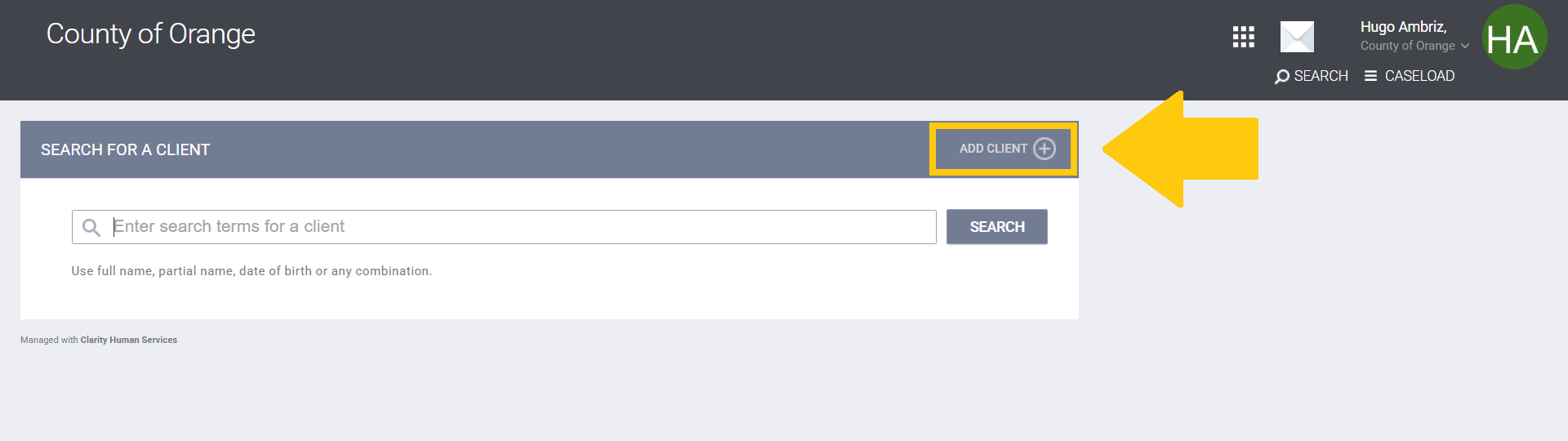
Step 3: On the client profile creation screen, click on the "Consent Refused" toggle on the right-hand side of the client profile creation screen; this action will automatically populate client refused responses for the Name and Social Security Number fields
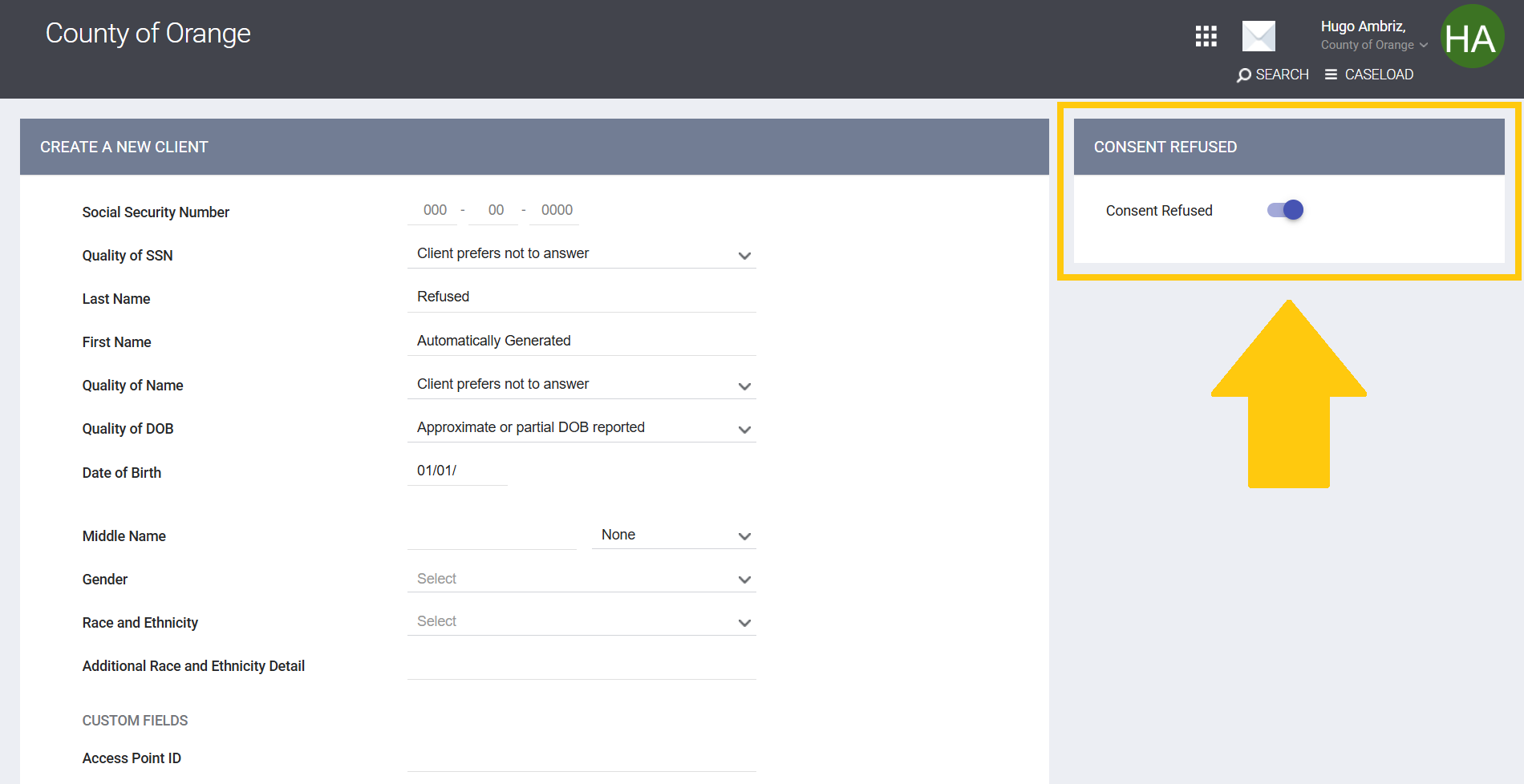
Step 4: Within the Date of Birth field, enter the client's birth year so that their approximate age can be calculated; keep the birth month and day fields as 01/01
Step 5: Fill out each of the following fields:
Race and Ethnicity
Indicate client’s self-identification with one or more different racial and/or ethnic categories. This field is a required HUD Universal Data Element.
- American Indian, Alaska Native or Indigenous: A person who identifies with any of the original peoples of North, Central, and South America.
- Asian or Asian American: A person who identifies with one or more nationalities or ethnic groups originating in East Asia, Southeast Asia, or the Indian subcontinent.
- Black, African American or African: A person who identifies with one or more nationalities or ethnic groups originating in any of the Black racial groups of Africa, including AfroCaribbean.
- Hispanic/Latina/o: A person who identifies with one or more nationalities or ethnic groups originating in Mexico, Puerto Rico, Cuba, Central and South American, and other Spanish cultures.
- Middle Eastern or North African: A person who identifies with one or more nationalities or ethnic groups with origins in the Middle East and North Africa.
- Native Hawaiian or Pacific Islander: A person who identifies with one or more nationalities or ethnic groups originating in Hawaii, Guam, Samoa, or another Pacific Island.
- White: A person who identifies with one or more nationalities or ethnic groups originating in Europe.
- Client doesn't know: Client does not know their race(s)/ethnicity
- Client prefers not to answer: Client chooses not to identify their race(s)/ethnicity
- Data not collected: Staff member did not attempt to collect the client's race/ethnicity
Veteran Status
Indicate whether clients have ever spent time in the United States Armed Forces and may be eligible for VA Homeless Programs. This field is a required HUD Universal Data Element.
-
No: Client has never spent any time in the United States Armed Forces. This includes individuals who attended training but were discharged before reporting to a duty station, and Reservists or National Guard who were never activated or deployed.
-
Yes: Client has ever served in the Armed Forces of the United States, regardless of discharge status or length of service
-
Client doesn't know: Client does not know their veteran status.
-
Client prefers not to answer: Client chooses not to identify their veteran status.
-
Data not collected: Staff member did not attempt to collect the client's veteran status.
Gender (Optional)
Indicate client’s self-identification of one or more of the gender categories.
-
Woman: Client identifies as a woman.
-
Man: Client identifies as a man.
-
Culturally Specific Identity: Client identifies with an identity that is exclusive to a particular culture. For example, Two-Spirit refers to a Native North American gender identity.
-
Transgender: Client identifies with a transgender history, experience, or identity.
-
Non-Binary: Client does not identify exclusively as a man or a woman.
-
Questioning: Clients who may be unsure, may be exploring, or may not relate to or identify with a gender identity at this time.
-
Different Identity: Client identifies with another identity that is not listed as a response. A text box is provided for additional detail.
-
Client doesn't know: Client does not know their gender.
-
Client prefers not to answer: Client chooses not to identify their gender.
-
Data not collected: Staff member did not attempt to collect the client's gender identity.
Step 6: Enter your internal database's client ID for the client in the Access Point ID field
NOTE: Personal Identifiable Information (PII) is prohibited within SCES. Never enter the client’s Name, exact Date of Birth, and Social Security Number.

