


Background
To receive services through the Coordinated Entry System (CES), households must be enrolled in the Survivor Coordinated Entry project, complete the Current Living Situation and Survivor CES Assessment. Once these steps are complete, the household can be added to the Community Queue, where they may be matched to available housing opportunities.
Enroll Household into Survivor Coordinated Entry System
Step 1: If the household is not already in Survivor CES (SCES) Comparable Database, create a Client Profile for all household members. If there are exiting profiles, search the Head of Household using their SCES unique identifier.
Step 2: Open the 'program' tab at the top of the screen. Within the Programs screen, find the section titled, PROGRAMS: AVAILABLE. Enroll the household into the Survivor Coordinated Entry System program. Please visit our Knowledge Base article on Enrolling Clients in a Project for more information.
Survivor CES Access Points are encouraged to use the following script to introduce the Survivor CES enrollment questions:
“The information you share with us in these questions is valuable and important. This information helps us connect you to services and housing. The information about your living situation, disabling conditions, city of last permanent housing and the city where you were last night are really important because they help us understand your service and housing needs and eligibility.“
Complete the Current Living Situation
The Current Living Situation (CLS) assessment must be completed at project start in order to remain compliant with Coordinated Entry data collection requirements. Please refer to the SCES Current Living Situation Knowledge Base Article for instructions on creating and updating the CLS.
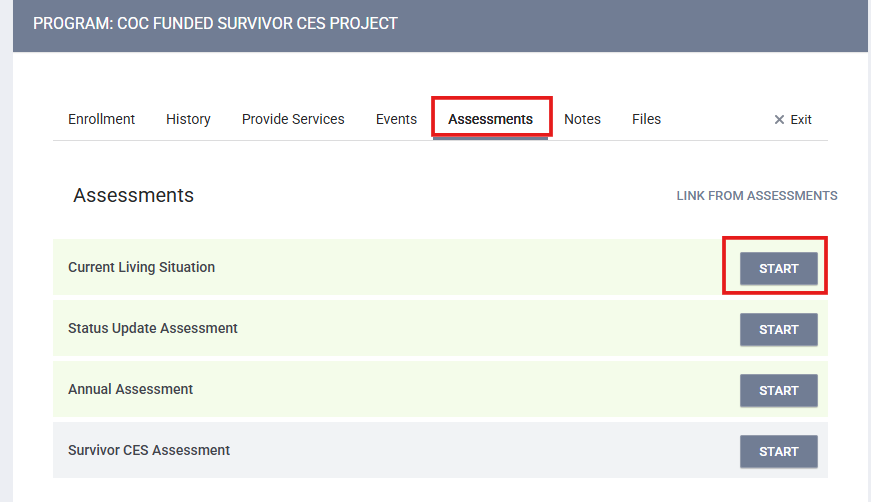
Step 1: To complete this step, navigate to the Assessment tab. From there, you will see the Current Living Situation assessment.
Step 2: Select Start and complete the Current Living Situation
Step 3: Select Save & Close to record the Current Living Situation
Complete the Survivor CES Assessment
The Survivor CES Assessment must be completed at project start as well and to provide the household housing preference.
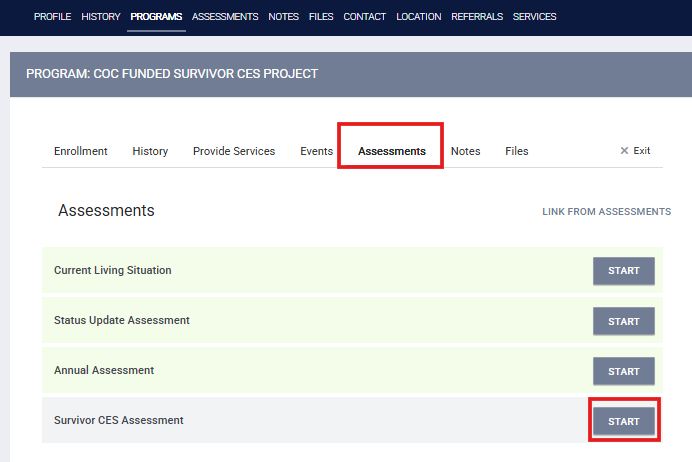
Step 1: While still under the Assessment tab of the Head of Household, select Start next to the Survivor CES Assessment.
Step 2: Complete the CES Assessment Questions
Housing Interest Information:
Select which of the following types of housing opportunities the client is interested in. General descriptions of each housing type are included to help guide the client's decision.
The client can skip or select as many of the housing options lists. Clients will only be considered for the housing types selected; their selections do not guarantee eligibility for any given project.
Accessibility Needs:
Housing resources outfitted with ADA accommodations or the ability to adapt for ADA needs are prioritized for those identified has having ADA needs.
If anyone the household has a disability, they may benefit from accessible housing. This includes accommodations like ramps or wider entrances, space for medical equipment or a wheelchair, or special light switches, electrical outlets, and other fixtures.
The CES assessment includes questions are about some common needs. If the client has needs not addressed by the questions, users should list them in the "Is there anything else about your accessibility needs that we should know?" text box.
OC Coordinated Entry System:
At the end of the assessment, you will be asked whether the household would like to be connected to Individual or Family Coordinated Entry opportunities.
Step 3: Select Save to record the Survivor CES Assessment
The household is enrolled, completed the CLS and a Survivor CES Assessment, and is now considered Assessed. At this point the household has been added to the Community Queue, which is where the household can be matched to housing opportunities.
Next steps for the SCES Access Point is working the household to collect homelessness and disability verification as needed to support with appropriate housing opportunity matches that requires specific program eligibilities.

